
Plugins
Node Flow uses a plugin system to add features without bloating the core. Plugins are self-contained modules that observe events, manage their own state, and add capabilities like minimap, autopan, and debug visualization.
How Plugins Work
Plugins follow a simple lifecycle:
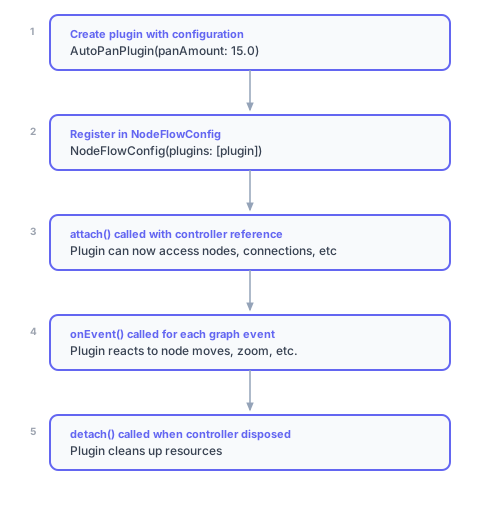
Built-in Plugins
Node Flow includes these built-in plugins:
| Plugin | Purpose | Default State | Access |
|---|---|---|---|
| AutoPanPlugin | Pan viewport when dragging near edges | Enabled | controller.autoPan |
| MinimapPlugin | Navigate overview panel | Visible | controller.minimap |
| SnapPlugin | Grid snapping and alignment guides | Disabled | controller.snap |
| LodPlugin | Adaptive overview and detail | Disabled | controller.lod |
| DebugPlugin | Debug overlays | Disabled | controller.debug |
| StatsPlugin | Graph statistics | Enabled | controller.stats |
Default Plugins
When no plugins are specified, Node Flow includes a default set:
// These are added automatically if plugins: is null
final defaultPlugins = [
  AutoPanPlugin(),      // Enabled by default
  DebugPlugin(),        // Disabled by default (mode: none)
  LodPlugin(),          // Full detail by default; call enable() to opt in
  MinimapPlugin(),      // Visible by default
  SnapPlugin(),         // Disabled by default (grid snapping)
  StatsPlugin(),        // Always available
];
Custom Plugin List
Override the defaults by providing your own list:
NodeFlowConfig(
  plugins: [
    // Only include what you need
    MinimapPlugin(visible: true),
    AutoPanPlugin(),
    // No debug, no LOD, no stats
  ],
)
Accessing Plugins
Plugins are accessed via typed getters on the controller:
// Each built-in plugin has a typed getter
controller.minimap?.toggle();
controller.autoPan?.useFast();
controller.lod?.enable();
controller.debug?.setMode(DebugMode.all);
controller.stats?.nodeCount;

// All getters return nullable types (null if not registered)
if (controller.minimap != null) {
  // Plugin is available
}
Resolving Custom Plugins
For custom plugins, use getPlugin<T>():
// Get a custom plugin by type
final myPlugin = controller.getPlugin<MyCustomPlugin>();

// Or create a typed plugin getter
extension MyPluginAccess<T> on NodeFlowController<T, dynamic> {
  MyCustomPlugin? get myPlugin =>
      getPlugin<MyCustomPlugin>();
}

// Then use it like built-in plugins
controller.myPlugin?.doSomething();
Creating Custom Plugins
Plugins implement the NodeFlowPlugin interface:
import 'package:vyuh_node_flow/vyuh_node_flow.dart';

class LoggingPlugin extends NodeFlowPlugin {
  NodeFlowController? _controller;

  @override
  String get id => 'logging';

  @override
  void attach(NodeFlowController controller) {
    _controller = controller;
    print('Logging plugin attached');
    print('Graph has ${controller.nodes.length} nodes');
  }

  @override
  void detach() {
    print('Logging plugin detached');
    _controller = null;
  }

  @override
  void onEvent(GraphEvent event) {
    switch (event) {
      case NodeAdded(:final node):
        print('Node added: ${node.id}');
      case NodeMoved(:final node, :final previousPosition):
        print('Node ${node.id} moved from $previousPosition');
      case ConnectionAdded(:final connection):
        print('Connection: ${connection.sourceNodeId} → ${connection.targetNodeId}');
      default:
        // Ignore other events
    }
  }
}
Plugin Properties
| Property/Method | Description |
|---|---|
id | Unique identifier (prevents duplicates) |
attach(controller) | Called when registered; store the controller reference |
detach() | Called when unregistered; clean up resources |
onEvent(event) | Called for each graph event |
Event Types
Plugins receive all graph events. The event system uses a sealed class hierarchy for exhaustive pattern matching:
@override
void onEvent(GraphEvent event) {
  switch (event) {
    // Node lifecycle events
    case NodeAdded(:final node): ...
    case NodeRemoved(:final node): ...
    case NodeMoved(:final node, :final previousPosition): ...
    case NodeResized(:final node, :final previousSize): ...
    case NodeDataChanged(:final node, :final previousData): ...
    case NodeVisibilityChanged(:final node, :final wasVisible): ...
    case NodeZIndexChanged(:final node, :final previousZIndex): ...
    case NodeLockChanged(:final node, :final wasLocked): ...
    case NodeGroupChanged(:final node, :final previousGroupId, :final currentGroupId): ...

    // Connection events
    case ConnectionAdded(:final connection): ...
    case ConnectionRemoved(:final connection): ...

    // Selection events
    case SelectionChanged(:final selectedNodeIds, :final selectedConnectionIds): ...

    // Viewport events
    case ViewportChanged(:final viewport, :final previousViewport): ...

    // Drag events (for tracking drag operations)
    case NodeDragStarted(:final nodeIds, :final startPosition): ...
    case NodeDragEnded(:final nodeIds, :final originalPositions): ...
    case ConnectionDragStarted(:final sourceNodeId, :final sourcePortId): ...
    case ConnectionDragEnded(:final wasConnected, :final connection): ...
    case ResizeStarted(:final nodeId, :final initialSize): ...
    case ResizeEnded(:final nodeId, :final initialSize, :final finalSize): ...

    // Hover events
    case NodeHoverChanged(:final nodeId, :final isHovered): ...
    case ConnectionHoverChanged(:final connectionId, :final isHovered): ...
    case PortHoverChanged(:final nodeId, :final portId, :final isHovered): ...

    // Lifecycle events
    case GraphCleared(:final previousNodeCount, :final previousConnectionCount): ...
    case GraphLoaded(:final nodeCount, :final connectionCount): ...

    // Batch events (for undo/redo grouping)
    case BatchStarted(:final reason): ...
    case BatchEnded(): ...

    // LOD (Level of Detail) events
    case LODLevelChanged(:final previousVisibility, :final currentVisibility): ...
  }
}
Event Reference
| Category | Event | Key Properties | Purpose |
|---|---|---|---|
| Node | NodeAdded | node | Node created |
NodeRemoved | node | Node deleted | |
NodeMoved | node, previousPosition | Position changed | |
NodeResized | node, previousSize | Size changed | |
NodeDataChanged | node, previousData | Data payload changed | |
NodeVisibilityChanged | node, wasVisible | Visibility toggled | |
NodeZIndexChanged | node, previousZIndex | Layer order changed | |
NodeLockChanged | node, wasLocked | Lock state toggled | |
NodeGroupChanged | node, previousGroupId, currentGroupId | Group membership changed | |
| Connection | ConnectionAdded | connection | Connection created |
ConnectionRemoved | connection | Connection deleted | |
| Selection | SelectionChanged | selectedNodeIds, selectedConnectionIds, previousNodeIds, previousConnectionIds | Selection state changed |
| Viewport | ViewportChanged | viewport, previousViewport | Pan/zoom changed |
| Drag | NodeDragStarted | nodeIds, startPosition | Drag operation began |
NodeDragEnded | nodeIds, originalPositions | Drag operation ended | |
ConnectionDragStarted | sourceNodeId, sourcePortId, isOutput | Connection drag began | |
ConnectionDragEnded | wasConnected, connection | Connection drag ended | |
ResizeStarted | nodeId, initialSize | Resize operation began | |
ResizeEnded | nodeId, initialSize, finalSize | Resize operation ended | |
| Hover | NodeHoverChanged | nodeId, isHovered | Node hover state changed |
ConnectionHoverChanged | connectionId, isHovered | Connection hover state changed | |
PortHoverChanged | nodeId, portId, isHovered, isOutput | Port hover state changed | |
| Lifecycle | GraphCleared | previousNodeCount, previousConnectionCount | Graph was cleared |
GraphLoaded | nodeCount, connectionCount | Graph was loaded | |
| Batch | BatchStarted | reason | Batch operation began |
BatchEnded | — | Batch operation ended | |
| LOD | LODLevelChanged | previousVisibility, currentVisibility, normalizedZoom | Detail level changed |
Stateful Plugins
Most plugins maintain observable state using MobX:
class SelectionTrackerPlugin extends NodeFlowPlugin {
  NodeFlowController? _controller;

  // Observable state
  final Observable<int> _selectionCount = Observable(0);
  final Observable<DateTime?> _lastSelectionTime = Observable(null);

  // Public accessors
  int get selectionCount => _selectionCount.value;
  DateTime? get lastSelectionTime => _lastSelectionTime.value;

  @override
  String get id => 'selection-tracker';

  @override
  void attach(NodeFlowController controller) {
    _controller = controller;
  }

  @override
  void detach() {
    _controller = null;
  }

  @override
  void onEvent(GraphEvent event) {
    switch (event) {
      case SelectionChanged(:final selectedNodeIds, :final previousNodeIds):
        runInAction(() {
          _selectionCount.value = selectedNodeIds.length;
          if (selectedNodeIds.length > previousNodeIds.length) {
            _lastSelectionTime.value = DateTime.now();
          }
        });
      default:
        break;
    }
  }
}
Using Stateful Plugins in UI
Observer(
  builder: (_) {
    final tracker = controller.getPlugin<SelectionTrackerPlugin>();
    if (tracker == null) return const SizedBox.shrink();

    return Text('${tracker.selectionCount} items selected');
  },
)
Custom UI Layers
Plugins can inject their own widget layers into the editor by implementing the LayerProvider interface. This powerful capability allows plugins to:
- Render custom UI overlays and controls
- Add debug visualizations
- Create custom interaction layers
- Display contextual information
- Build tool palettes or property panels
class MyOverlayPlugin extends NodeFlowPlugin implements LayerProvider {
  @override
  String get id => 'my-overlay';

  @override
  LayerPosition get layerPosition => LayerPosition(
    anchor: NodeFlowLayer.nodes,
    relation: LayerRelation.above,
  );

  @override
  Widget? buildLayer(BuildContext context) {
    // Return any Flutter widget - full creative freedom!
    return Positioned.fill(
      child: Stack(
        children: [
          // Custom painting layer
          CustomPaint(painter: MyOverlayPainter()),
          // Interactive widgets
          Positioned(
            right: 16,
            top: 16,
            child: MyToolPalette(),
          ),
        ],
      ),
    );
  }

  @override
  void attach(NodeFlowController controller) {}

  @override
  void detach() {}

  @override
  void onEvent(GraphEvent event) {}
}
The LayerPosition specifies where your layer appears relative to core layers:
- anchor: Which layer to position relative to (
grid,connections,nodes,interaction) - relation: Whether to render
aboveorbelowthe anchor layer
Built-in plugins like MinimapPlugin, DebugPlugin, and SnapPlugin use this to render their UI. Your custom plugins have the same full access to inject any Flutter widget into the editor's layer stack.
Plugin Patterns
Undo/Redo Plugin
Plugins are ideal for implementing undo/redo:
class UndoRedoPlugin extends NodeFlowPlugin {
  final List<GraphEvent> _undoStack = [];
  final List<GraphEvent> _redoStack = [];
  NodeFlowController? _controller;

  bool get canUndo => _undoStack.isNotEmpty;
  bool get canRedo => _redoStack.isNotEmpty;

  @override
  String get id => 'undo-redo';

  @override
  void attach(NodeFlowController controller) {
    _controller = controller;
  }

  @override
  void detach() {
    _controller = null;
  }

  @override
  void onEvent(GraphEvent event) {
    // Only track undoable events
    switch (event) {
      case NodeMoved():
      case NodeResized():
      case ConnectionAdded():
      case ConnectionRemoved():
        _undoStack.add(event);
        _redoStack.clear(); // Clear redo on new action
      default:
        break;
    }
  }

  void undo() {
    if (!canUndo) return;
    final event = _undoStack.removeLast();
    _redoStack.add(event);
    _applyInverse(event);
  }

  void redo() {
    if (!canRedo) return;
    final event = _redoStack.removeLast();
    _undoStack.add(event);
    _applyEvent(event);
  }

  void _applyInverse(GraphEvent event) {
    // Implement inverse operations
  }

  void _applyEvent(GraphEvent event) {
    // Implement forward operations
  }
}
Auto-Save Plugin
class AutoSavePlugin extends NodeFlowPlugin {
  final Duration debounceTime;
  final void Function(Map<String, dynamic>) onSave;

  Timer? _debounceTimer;
  NodeFlowController? _controller;

  AutoSavePlugin({
    this.debounceTime = const Duration(seconds: 2),
    required this.onSave,
  });

  @override
  String get id => 'auto-save';

  @override
  void attach(NodeFlowController controller) {
    _controller = controller;
  }

  @override
  void detach() {
    _debounceTimer?.cancel();
    _controller = null;
  }

  @override
  void onEvent(GraphEvent event) {
    // Debounce save on any data change
    switch (event) {
      case NodeAdded():
      case NodeRemoved():
      case NodeMoved():
      case ConnectionAdded():
      case ConnectionRemoved():
        _scheduleSave();
      default:
        break;
    }
  }

  void _scheduleSave() {
    _debounceTimer?.cancel();
    _debounceTimer = Timer(debounceTime, () {
      if (_controller != null) {
        onSave(_controller!.toJson());
      }
    });
  }
}
Best Practices
- Keep plugins focused: Each plugin should do one thing well
- Use MobX for state: Makes plugin state reactive with UI
- Handle detach properly: Clean up timers, listeners, subscriptions
- Provide typed accessors: Add plugin methods for ergonomic access
- Use pattern matching: Handle only the events you care about
- Consider batching: Use
BatchStarted/BatchEndedfor grouping related changes